
IPs and VLAN tags in this post are illustrative. The topology is real, the numbers are not.
An enterprise team measures a virtualization platform on what it ends up carrying: infrastructure as code, secrets management, identity, CI, network segmentation, backup. The hypervisor is table stakes. The platform is what earns the budget line.
This post is what one Proxmox node looks like on a home-lab budget.
The workflow moved off the web UI
The Proxmox node is the same hardware from the migration post. The web UI still works. I stopped using it for anything that creates a VM or an LXC.
Every new guest comes from one template. VM 9000 is a Debian 13 image with cloud-init baked in. A new host is a clone plus a cloud-init userdata file:
qm clone 9000 142 --name vault-lxc --full
qm set 142 --cicustom "user=local:snippets/vault-userdata.yaml"
qm start 142
The userdata file sets the hostname, the network, the SSH key, and the first user. The clone takes about six seconds, and the boot takes about twenty. The full path from clone to working SSH takes under a minute, and none of it uses the web UI.
The API caller uses a scoped token, not the root account. Proxmox has a token system for exactly this, and the token belongs to automation@pve. Its role can clone, configure, start, and stop guests. It cannot reach storage or cluster settings. A leaked token can boot a VM. It cannot reshape the host.
An enterprise team calls this pattern Packer plus Terraform plus a scoped service account. My lab uses qm clone and a shell script. The tools are smaller. The shape is the same: a golden image, a declarative spec, and an account with the minimum rights to apply it.
LXC by default, VM when the workload needs it
Proxmox gives you two first-class guest types, and the choice between them is the most consequential platform decision after the network layout. The rule I use is simple.
LXC container by default: any Linux service that plays nice with the host kernel, wants fast boot, and does not need kernel modules or a different OS. Vault, Forgejo, CI runners, reverse proxies, most databases: all LXC.
VM when you need a different kernel, so Windows, BSD, or a Linux version that does not match the host. VM also when you need a kernel module the host does not have, or hard isolation for something you do not trust.
The gain from defaulting to LXC is real. Memory overhead is tens of MB instead of hundreds, boot is under two seconds, and density on a single node moves from a dozen VMs to fifty containers with room left over. Enterprise clusters run the same math with Kubernetes on bare metal versus a full VM per service. Proxmox lets you keep both options on the same node without a second orchestrator.
The cost of LXC density is a shared kernel. If a container escapes to root, the host is at risk in a way a VM guest is not. So LXC for services I trust and control, VM for anything third-party or internet-facing that I have not audited end to end.
Secrets stopped living in files
Before Vault, tokens lived in .env files, in shell history, and in half a dozen runbooks. A rotation meant finding every copy, which meant I did not rotate.
Vault runs on 10.10.10.20, single node, TLS from the lab CA. Automation callers use AppRole, not long-lived tokens, so a leaked role_id needs a matching secret_id to do anything, and the secret_id has a TTL.
A caller fetches a secret through a wrapper, vault-get.sh, which exists to hide three traps that bit me on the raw path:
# fetch the Proxmox automation token
export TOKEN=$(./vault-get.sh secret/lab/proxmox api_token)
Trap one is TLS trust. Not every caller reads the OS trust store. Sandboxed processes, minimal container images, and some language runtimes ship their own CA bundle and never see the system’s, so a call that works from an interactive shell fails from the same script under systemd or a CI job. The wrapper sets VAULT_CACERT to the lab CA on every call, which sidesteps the whole class.
Trap two is the KV v2 path. The HTTP path is /v1/secret/data/lab/foo, and the value sits at .data.data.<field>, which the CLI hides but curl does not.
Trap three is auth lifetime. The wrapper logs in with AppRole and throws the token away on exit, so nothing long-lived ends up in the environment or in a process listing.
An enterprise team runs Vault the same way, with three nodes for HA and an audit device pointed at a SIEM. My lab runs one node and logs to disk. The interface, the auth model, and the path layout carry across, so what I learn here is what I would use at work.
Git and CI moved in-house
The repos live on Forgejo at 10.10.10.22:2222, and CI runs on a self-hosted runner on the dev LXC. Main is protected on every repo that has tests. A merge needs a PR, and a PR needs green CI.
The runner registers against Forgejo with a token, and the config is short:
./act_runner register --instance http://10.10.10.22:3000 --token <token> --name dev-lxc-runner
./act_runner daemon --config /etc/act_runner/config.yaml
The runner has LAN access to Vault, to the Proxmox API, and to the dev database, so CI jobs can pull real secrets and hit real internal services, which a cloud runner cannot do without punching a hole in the firewall.
An enterprise team calls this GitHub Enterprise plus self-hosted runners in a VPC, and pays six figures a year for it. Forgejo plus act_runner on a Debian LXC costs zero, and the workflow shape is identical: protected branch, mandatory PR, CI against real infrastructure.
The network grew a workload tier
The migration post had one flat LAN, because the lab had one flat purpose. One flat LAN stops being safe the moment a workload guest can address the Proxmox API directly. That risk does not care what the workload is: a jump host that got popped, a misbehaving container, a third-party appliance that phones home. The management plane belongs on its own segment.
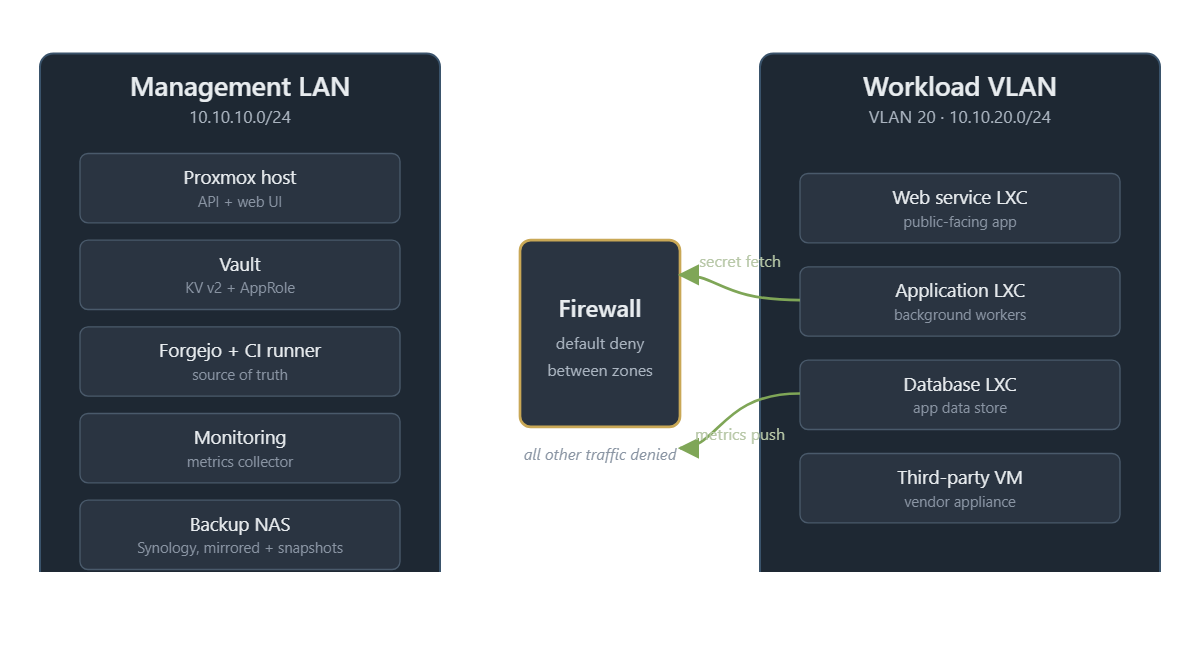
The management LAN, 10.10.10.0/24, carries the infra: Proxmox, Vault, Forgejo, monitoring, backup targets. VLAN 20, 10.10.20.0/24, carries the workloads themselves. The firewall allows specific workload-to-management flows on named service ports (Vault for secret fetch, the monitoring endpoint), and drops everything else by default.
The Proxmox side of this is one line per guest at create time:
qm set 150 --net0 virtio,bridge=vmbr0,tag=20An enterprise team calls this management-plane and workload-plane segmentation, and enforces it with a next-gen firewall and a policy engine. My lab uses a firewall appliance and hand-written rules. The rule count is small enough to read cover to cover, which is its own kind of security control.
What is still a pet
The single node. Not the backups.
Backups run on a schedule to a Synology NAS with mirrored RAID and its own snapshot layer, so a corrupted archive on the primary volume still has a snapshot chain behind it, and a single failed disk on the NAS loses nothing. Restore is a Proxmox restore from the NAS-hosted archive. That part of the platform is boring, which is what you want a backup target to be.
The node itself is a single point of failure by design, because a second node costs power I do not want to pay for. Uptime target is “the house has power and the ISP is up,” which is fine for a lab, and would be a career-limiting move in production.
The pattern that carries into an enterprise is separating the backup target from the primary storage, which the Synology does. The pattern I am not paying for at home is HA, which is the thing that turns a lab into a production platform.
Closing
The migration post ended with a working Proxmox node. This post ends with a working platform, which is a different thing. Templates, tokens, secrets, CI, VLANs: none of them are exotic, and none of them are optional once the platform holds more than one project.
The next post in this line is a Vault deep-dive, because AppRole and KV v2 deserve their own space. Until then, the migration post is still the front door, and this one is the map of what the house looks like now.